


DNS security analysis
Misconfigured DNS records are the silent backdoor attackers love. FortWatch validates your whole DNS posture — from email authentication to subdomain-takeover risk.
SPF · DKIM · DMARC · DNSSEC · Takeover
DNS security
example.com · re-checked every 6h
- SPFPass
v=spf1 include:_spf.google.com ~all
- DKIMPass
2 valid signing keys · rotated 18d ago
- DMARCWarn
p=none — upgrade to quarantine or reject
- DNSSECFail
Not enabled — email spoofing risk
- CAAPass
Let's Encrypt, DigiCert authorized
Email authentication checks
Improperly configured email records let attackers send phishing emails from your domain. FortWatch checks every layer of email authentication.
SPF Records
Validate sender authorization policies and detect overly permissive configurations.
DMARC Policies
Check enforcement mode, reporting configuration, and alignment settings.
DKIM Signing
Verify DKIM key presence and configuration for email integrity.
Infrastructure DNS security
Beyond email, DNS misconfigurations can expose your infrastructure to hijacking, cache poisoning, and unauthorized certificate issuance.
DNSSEC Validation
Check for signed zones and proper chain of trust.
CAA Records
Verify which certificate authorities are authorized to issue certificates for your domain.
Zone Transfer
Test for unauthorized zone transfer (AXFR) exposure.
Subdomain takeover detection
Dangling CNAME records pointing to deprovisioned services are a top attack vector. FortWatch detects these before attackers claim your subdomains.
Automated detection of dangling CNAMEs across all subdomains
Coverage for AWS, Azure, GitHub Pages, Heroku, and 20+ cloud services
Real-time alerts when a new dangling record is detected
Continuous monitoring
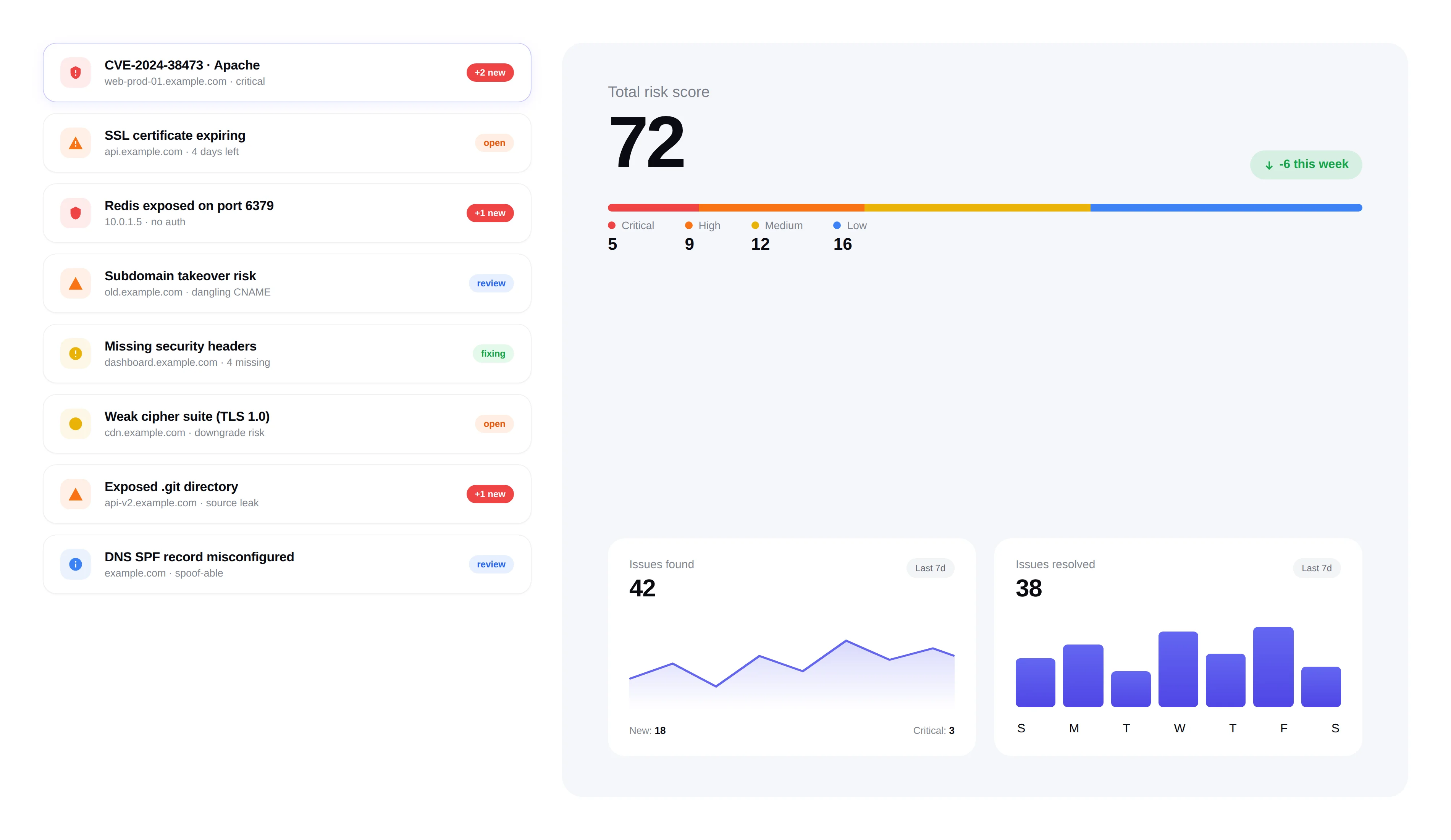
DNS configurations change. FortWatch continuously monitors your records and alerts you when something drifts from a secure baseline.
Scheduled DNS checks on every scan cycle
Change detection with before/after comparison
Severity-rated findings integrated into your issue tracking workflow
Frequently asked questions
Answers to the most common questions about DNS security, email authentication, and subdomain takeover.
What is SPF and why does it matter?+
SPF (Sender Policy Framework) is a DNS TXT record that lists the servers and services allowed to send email on behalf of your domain. When a receiving mail server gets a message claiming to come from you, it checks the sending IP against your SPF record — if the IP isn't authorized, the message can be rejected or marked as spam. A missing or overly permissive SPF record (for example, ending in `+all` or listing too many third parties) lets attackers spoof your domain and send phishing emails that look like they came from your company.
What is DKIM and how does FortWatch check it?+
DKIM (DomainKeys Identified Mail) cryptographically signs outbound emails so recipients can verify the message wasn't altered in transit and truly originated from your domain. The public key lives in DNS under a selector (e.g. `selector1._domainkey.yourdomain.com`). FortWatch queries common selectors used by Google Workspace, Microsoft 365, Mailgun, SendGrid, Postmark and others, verifies the key is present, well-formed, and of sufficient length, and flags weak keys (under 1024 bits) or missing selectors for providers you actively send through.
What is DMARC and what's the difference between quarantine and reject?+
DMARC (Domain-based Message Authentication, Reporting and Conformance) tells receiving mail servers what to do with messages that fail SPF or DKIM alignment. The policy can be `p=none` (monitor only — attackers can still spoof you), `p=quarantine` (failing mail goes to spam/junk), or `p=reject` (failing mail is bounced outright). Reject is the strongest protection against email spoofing; quarantine is the common stepping-stone while you audit legitimate senders. FortWatch flags any domain stuck at `p=none` and highlights DMARC records missing `rua` reporting addresses.
What is DNSSEC and why is it important?+
DNSSEC (DNS Security Extensions) cryptographically signs your DNS responses so resolvers can verify they haven't been tampered with in transit. Without DNSSEC, attackers who can intercept or poison DNS traffic — on public Wi-Fi, through BGP hijacks, or at upstream resolvers — can silently redirect your visitors to malicious servers. FortWatch checks whether your zone is signed, whether the chain of trust from the root to your domain is intact, and whether your DS records at the registrar match the DNSKEY records at your nameservers.
How often does FortWatch check DNS records?+
DNS is checked on every scan cycle — typically every 24 hours on paid plans, with manual re-scans available at any time. Every check is compared against the last known-good baseline so you get a diff when something changes: a new SPF include, a flipped DMARC policy, a swapped nameserver, a missing DKIM selector. Severity-rated findings are opened as issues and routed through the same triage workflow as the rest of your vulnerability data.
How does FortWatch detect subdomain takeover?+
Subdomain takeover happens when a CNAME points to a cloud resource (AWS S3 bucket, Azure app, GitHub Pages site, Heroku app, Netlify site, etc.) that's been deprovisioned — leaving the DNS entry dangling. An attacker who claims the abandoned resource immediately controls your subdomain. FortWatch enumerates your subdomains, follows every CNAME, and matches target fingerprints against 20+ known-vulnerable provider signatures. When a dangling record is found, you get an alert with the exact subdomain, target, and takeover path.
Will FortWatch detect nameserver (NS) changes?+
Yes. NS records are part of the DNS baseline FortWatch tracks. If your nameservers change — whether because you migrated DNS providers intentionally or because an attacker compromised your registrar account — the next scan opens a high-severity finding with the old and new NS sets side by side. Unexpected NS changes are one of the earliest indicators of a domain hijack, so they're surfaced immediately rather than batched with lower-priority findings.
How does DNS security reduce email spoofing risk?+
Email spoofing works by sending mail that claims to be from your domain while actually originating from attacker-controlled infrastructure. SPF, DKIM, and DMARC together make this impossible for compliant receivers to deliver as legitimate. FortWatch validates the full chain — SPF authorizes senders, DKIM proves integrity, DMARC enforces the policy — and flags gaps that leave your brand exposed to phishing, business email compromise, and invoice fraud. A domain with `p=reject` DMARC, a tight SPF record, and active DKIM signing is effectively unspoofable through the normal email channel.
Explore more of FortWatch
Every feature runs on one platform and shares the same data. Jump to another, or see the full set.
Scanning & discovery
Secure your entire stack today
Start scanning in under 5 minutes. No credit card required. 7-day free trial included.