


Threat level scoring
A single 0-100 score that tells you exactly where your security stands — weighted by severity, updated in real time, and benchmarked against your peers.
0–100 score · Severity-weighted · Real-time · Benchmarked
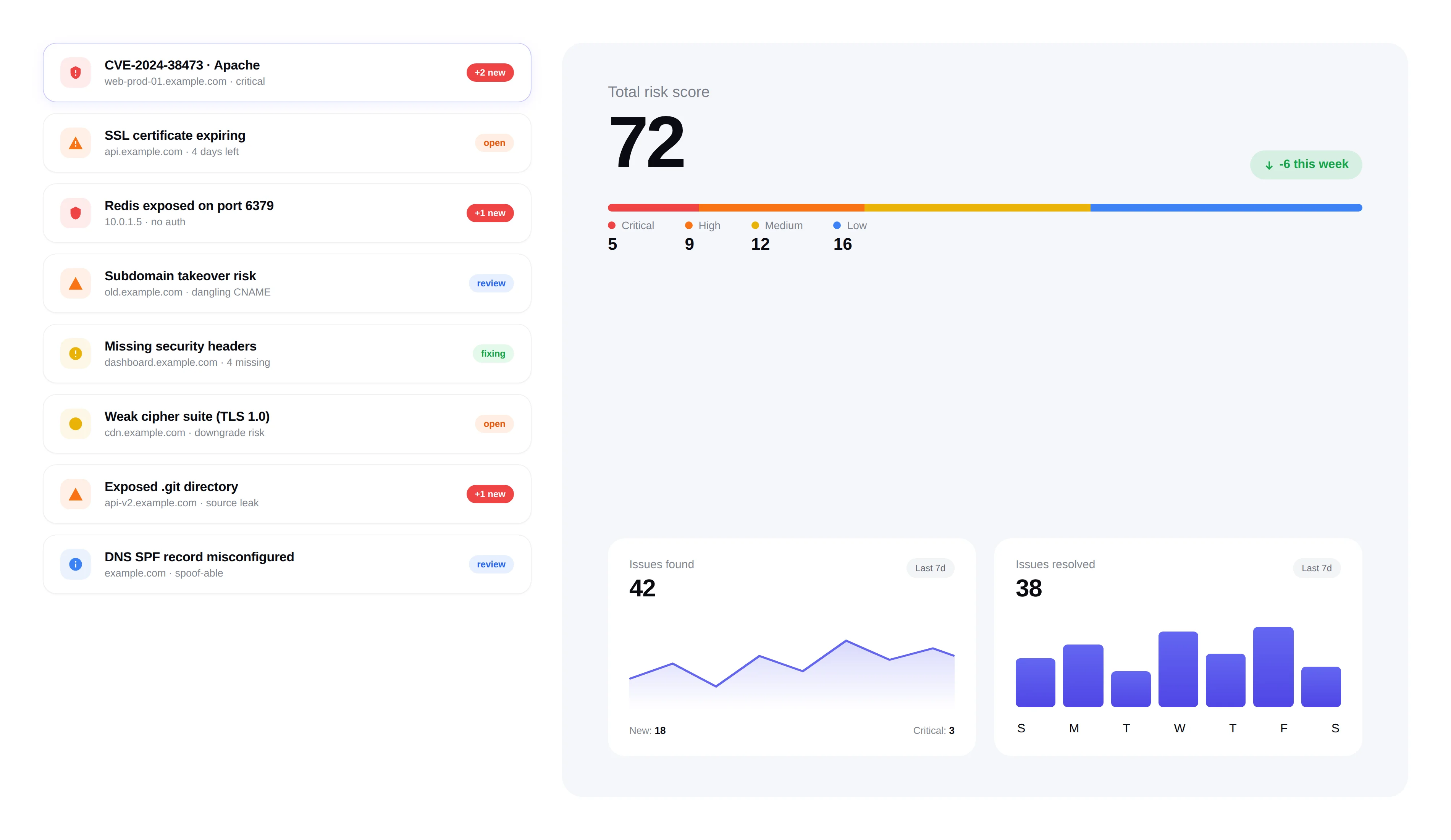
Threat level
Last 24h · example.com workspace
Elevated risk
↓ Improving · -6 this week
How it's calculated
Your threat level score is a weighted sum of all open findings across your assets. Each severity level carries a different weight, so critical issues move the needle far more than low-severity ones.
Critical findings
10 points each.
High findings
4 points each.
Medium findings
1.5 points each.
Low findings
0.5 points each.
Per-asset scoring
Every asset in your inventory gets its own individual threat level score. Quickly identify which domains or IPs carry the most risk.
Individual scores for every domain and IP address
Sort and filter assets by threat level
Color-coded severity indicators for instant visual assessment
Trend tracking
Watch your threat level score change over time. Track improvements as you remediate vulnerabilities and catch regressions early.
Historical score graphs over days, weeks, and months
Score change notifications when thresholds are crossed
Before-and-after comparison after remediation efforts
Executive reporting
Share your threat level score with stakeholders, executives, and auditors. A single number that communicates security posture without technical jargon.
Board-ready security posture metric
Exportable trend reports for compliance and audits
Benchmark against industry averages
Real-time updates
Your threat level recalculates automatically every time a scan completes, an issue is resolved, or a new finding is discovered.
Automatic recalculation after every scan
Instant score updates when issues are resolved
Dashboard widget showing current score at a glance
Frequently asked questions
Answers to the most common questions about the threat level score, CVSS alignment, trends, and benchmarking.
How is the FortWatch threat level score calculated?+
The threat level is a weighted 0-100 score derived from every open finding across your attack surface. Critical findings contribute 10 points each, High findings 4 points, Medium 1.5 points, and Low 0.5 points. The sum is normalized to a 0-100 scale so a single number reflects both the count and the severity of outstanding issues. The score recalculates automatically every time a scan completes or an issue is resolved.
How does the FortWatch score differ from a raw CVSS score?+
CVSS rates the severity of a single vulnerability in isolation. The FortWatch threat level score aggregates the severity of every open finding on your attack surface into one prioritized risk rating for the workspace. We use CVSS-aligned severity buckets (Critical, High, Medium, Low) as the weighting input, but the output tells you how exposed your whole environment is — not how dangerous one CVE would be in a lab.
Is the score per-asset or per-workspace?+
Both. Every domain and IP in your inventory gets its own threat level score so you can instantly see which assets carry the most risk. The workspace-level score rolls those per-asset scores up into a single number for executives, auditors, and dashboards. You can sort assets by score, filter by severity, and drill from the workspace rating into the specific findings driving it.
Do you track threat level history and trends?+
Yes. FortWatch stores the score after every scan and plots it on daily, weekly, and monthly trend graphs. You can see the exact moment a new finding pushed your score up, watch it drop as issues get fixed, and run before-and-after comparisons on remediation work. Score change alerts fire when a configurable threshold is crossed so regressions never go unnoticed.
How do I improve my threat level score?+
Work the list top-down by severity. Closing a single Critical finding improves the score more than closing a dozen Lows because of the 10-to-0.5-point weighting. Start with Criticals, then Highs, then Mediums. Every finding includes AI-generated remediation guidance, and marking an issue fixed or dismissed triggers an immediate recalculation so you see your score climb as you work.
What counts as a good threat level score?+
Under 20 is healthy — a mostly clean surface with only low-severity noise. 20-40 means meaningful issues to triage but no fires. 40-70 indicates real exposure that a motivated attacker could exploit. Above 70 means Critical or stacked High findings are present and immediate remediation is required. Zero is achievable on small surfaces, but sustained scores under 20 are the realistic target for a healthy production environment.
Can I benchmark my score against other companies?+
Yes. FortWatch publishes anonymized industry averages for comparable attack surface sizes so you can see whether your score is ahead of, in line with, or behind peers in your sector. The benchmark appears directly on the dashboard alongside your own trend line and is included in the exportable executive reports you share with boards and auditors.
Are score thresholds used for alerts and reporting?+
Yes. You set thresholds for the workspace and for individual assets; FortWatch fires an alert the moment the score crosses one. Thresholds also drive executive reports — the monthly summary highlights any asset that spent time above its configured threshold, and SOC 2 / ISO 27001 exports include the threshold-breach timeline as evidence of continuous monitoring.
Explore more of FortWatch
Every feature runs on one platform and shares the same data. Jump to another, or see the full set.
Scanning & discovery
Secure your entire stack today
Start scanning in under 5 minutes. No credit card required. 7-day free trial included.