


SLA & compliance tracking
Set remediation deadlines by severity, track adherence across your infrastructure, and generate audit-ready reports that prove your security posture to any auditor.
Time-to-fix · MTTR · Breaches · SOC 2 reports
SLA compliance
87% on-time overall · Q1 2026
Severity-based SLA deadlines
Define how quickly each severity level must be remediated. FortWatch tracks every issue against your SLA and flags anything falling behind.
Critical
Default 7-day remediation window.
High
Default 30-day remediation window.
Medium
Default 60-day remediation window.
Low
Default 120-day remediation window.
Compliance dashboard
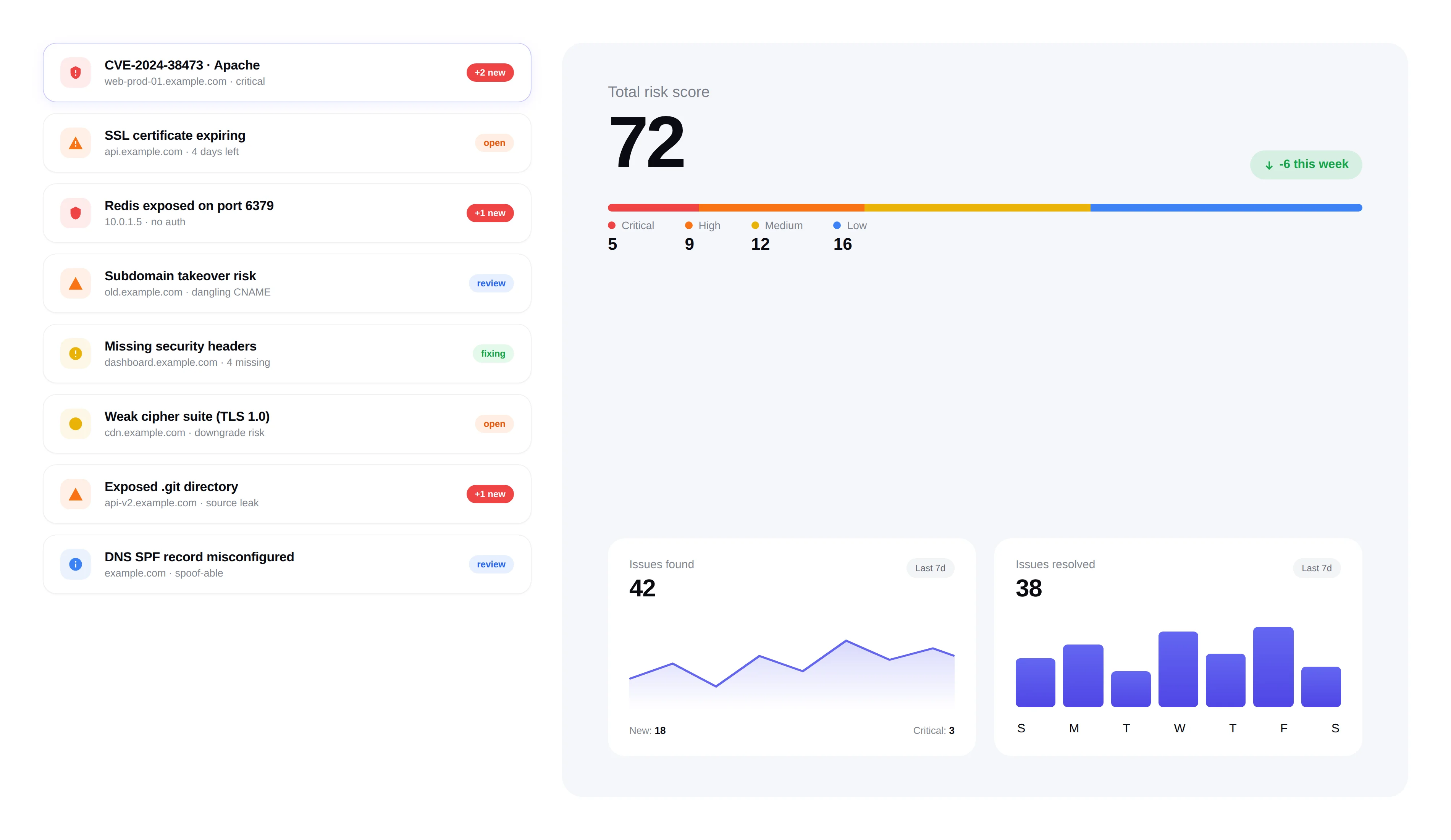
See your compliance posture at a glance. Track SLA adherence rates, overdue issues, average time to remediation, and trends over time.
Real-time SLA adherence percentage by severity
Overdue issues highlighted with days past deadline
Mean time to remediation (MTTR) tracking
Historical trend charts for executive reporting
Audit-ready reports
Generate professional compliance reports with one click. Designed for SOC 2 audits, board presentations, and client security questionnaires.
PDF reports with executive summary and detailed findings
Compliance score breakdown by category and severity
Remediation timeline showing issues found, fixed, and outstanding
Export to CSV for custom analysis and integration
Built for accountability
Compliance isn't just about reports — it's about making sure issues get fixed on time. FortWatch keeps your team accountable with automated escalation.
Automated alerts when SLA deadlines approach
Escalation notifications for overdue critical issues
Team-level SLA performance tracking
Frequently asked questions
Answers to the most common questions about SLA policies, breach handling, and audit reporting.
How does FortWatch measure SLA compliance?+
Every issue gets a clock that starts the moment it's first detected and stops the moment it's marked fixed (and verified on the next scan). SLA compliance is calculated as the percentage of issues resolved inside their severity-based window. You can see adherence live by severity, by team, or by asset group, and the history is preserved so you can show trends over weeks, quarters, and audit cycles.
What are the default remediation deadlines per severity?+
Defaults are Critical in 7 days, High in 30 days, Medium in 60 days, and Low in 120 days — in line with common SOC 2 and ISO 27001 expectations. Every window is customizable per workspace. Teams under stricter frameworks (PCI DSS, HIPAA) typically tighten Critical and High; teams with long change windows loosen Medium and Low. The clock always follows the configuration in effect when the issue was opened.
What happens when an issue breaches its SLA?+
Breached issues are flagged in the dashboard with days-past-deadline, surfaced in a dedicated overdue queue, and excluded from your compliant count. Nothing is silently closed. Breaches stay visible until the issue is either remediated or explicitly risk-accepted with a documented reason, which is recorded in the audit log and shows up in the compliance report alongside the original SLA miss.
Do I get reminders before a deadline is missed?+
Yes. FortWatch sends reminders as deadlines approach — typically a warning when an issue enters the last quarter of its window, an at-risk alert a few days out, and an escalation notification the moment it goes overdue. Reminders go to the assignee, their manager, and any configured channel (email, Slack, webhook) so the right people see the clock before it becomes a breach.
Can I produce reports my auditor will accept?+
Yes. FortWatch generates one-click PDF reports covering SLA adherence by severity, MTTR, open and fixed issue counts, overdue items with justifications, and a full remediation timeline. Everything is timestamped and tied to the audit log, so SOC 2, ISO 27001, and client security questionnaires can be answered with evidence rather than screenshots. CSV export is available for custom reporting.
Are the SLA windows customizable?+
Every window is editable per severity, per workspace. You can also set different SLAs for different asset groups — for example, tighter windows on production infrastructure than on staging — and schedule changes to take effect on a specific date so existing issues aren't retroactively breached. All changes are recorded in the audit log.
How does escalation work for overdue critical issues?+
When a critical issue crosses its deadline, FortWatch automatically escalates: the assignee is notified, their workspace admin is copied, and the issue is pinned to the overdue queue. Escalation routes are configurable, so you can send overdue criticals to a security-leadership Slack channel, an on-call rotation, or a ticketing webhook. The escalation event itself is logged for auditor review.
Why does SLA tracking matter for compliance frameworks?+
Frameworks like SOC 2, ISO 27001, PCI DSS, and HIPAA don't just ask whether you find vulnerabilities — they ask whether you fix them on a defined timeline. An auditor's first question is usually 'what's your remediation SLA, and can you prove you meet it?' FortWatch turns that into a single report: the policy, the performance against it, and the exceptions. Without that, compliance becomes a spreadsheet exercise; with it, the evidence is already in place.
Explore more of FortWatch
Every feature runs on one platform and shares the same data. Jump to another, or see the full set.
Scanning & discovery
Secure your entire stack today
Start scanning in under 5 minutes. No credit card required. 7-day free trial included.